Building AI products
Taking a complex product from its foundations to clear workflows, useful AI support and a working prototype.
How far can one designer push a complex product with AI?
I built an AI-native case management system to find out.
The project started from a familiar enterprise problem. Case management products hold large amounts of information, but still leave people to work out what matters, reconstruct what happened and decide what to do next.
Agents hunt through records, combine generic filters and rebuild the story from scattered fields, notes and messages. That friction reaches the customer. Replies slow down, context gets missed and people are asked to explain the same issue twice.
Adding a chatbot does not fix this. It creates another place to ask for information the product already has.
I wanted to explore a different model: a product structured around operational decisions, with AI embedded where it can reduce real cognitive work. Not a thin AI layer over a legacy interface. A coherent system designed around what people and AI are each good at.
1. Starting with the operational model
Most case management systems are shaped by backend records. The list behaves like a database table. The case behaves like a form. The user does the work of turning data into an understanding of the situation.
I reframed the product around three questions:
- What is happening?
- What matters now?
- What should happen next?
Cases became operational situations, not collections of fields. State became explicit instead of scattered. This changed the model before it changed the interface.
A lifecycle status such as Open or In progress is not enough to describe operational work. Two open cases may need completely different actions. One is waiting on the customer. Another has no owner. A third is close to breaching its SLA.
I separated lifecycle status, operational state and signals. Together they produce a clearer case condition that the queue, workspace and AI layer can all use.
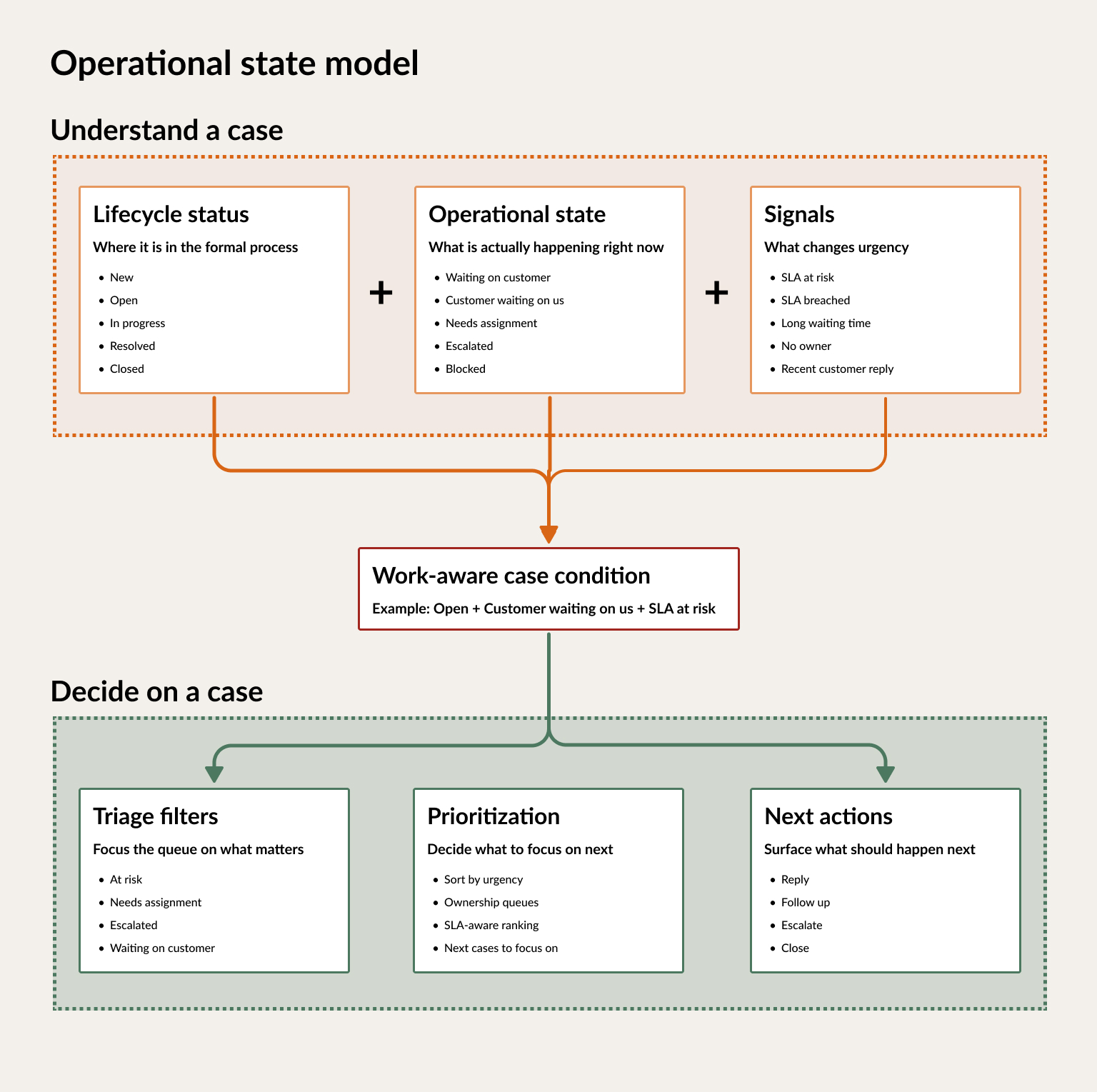
The model turns passive status tracking into work-aware prioritisation and next actions.
2. Case list, reframed as a triage queue
The list stops being a passive table.
The top of the page frames the workload before anyone looks at an individual row: how many cases exist, how they are distributed and which groups need attention. Filters reflect real operational states such as waiting on customer, escalated, needs assignment and assigned to me.
The table separates case identity, operational state, urgency and ownership. Agents can scan under pressure without opening or reading every case in full.
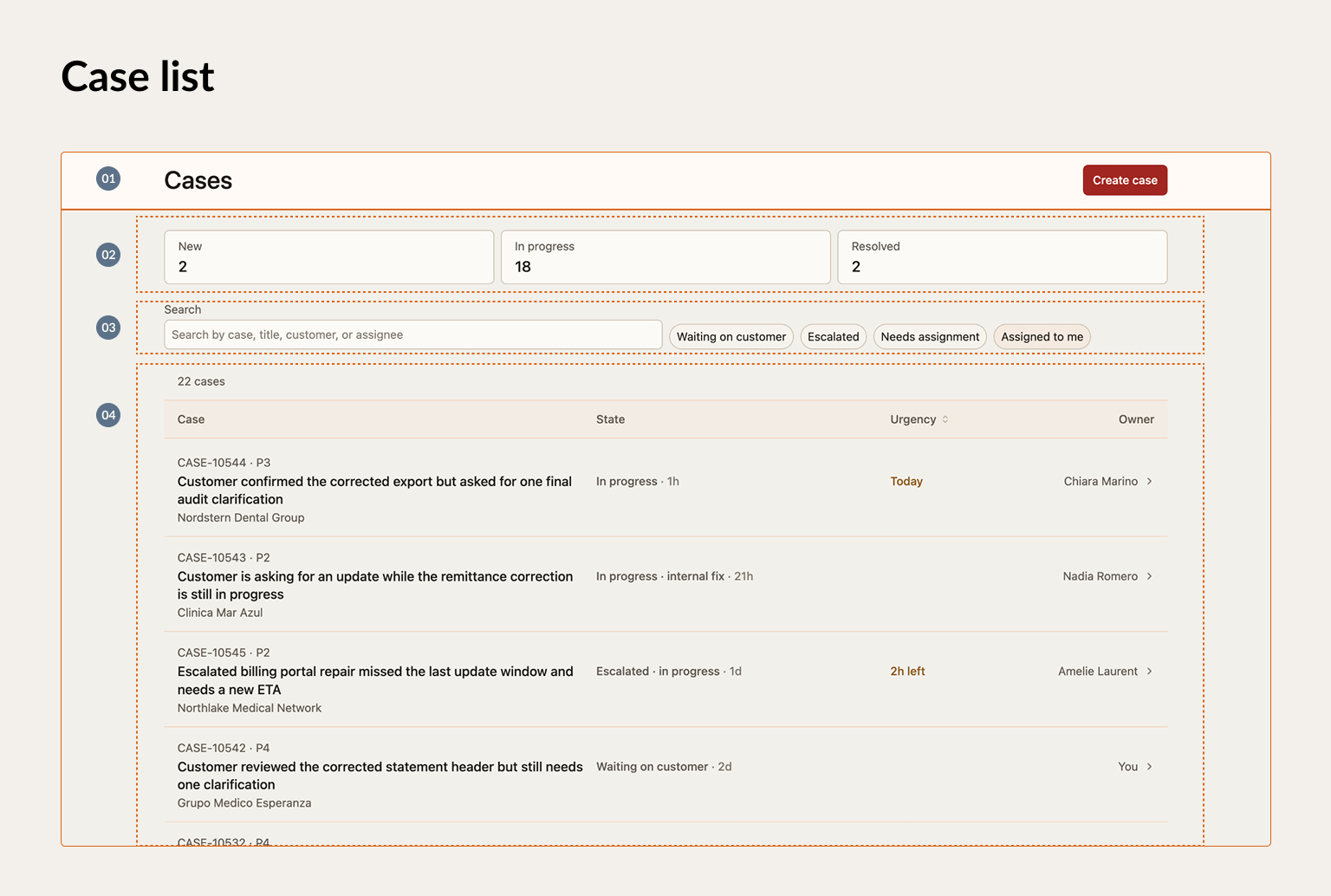
The list moves from workload overview to focused prioritisation.
3. Case record, reframed as a decision workspace
The record stops being a form.
A header gives immediate orientation. The activity timeline turns scattered messages, notes and system updates into one readable story. The decision panel sits on top of that context and connects understanding to action.
The interface is not trying to display everything with equal weight. It is helping the user understand the situation and move the case forward.
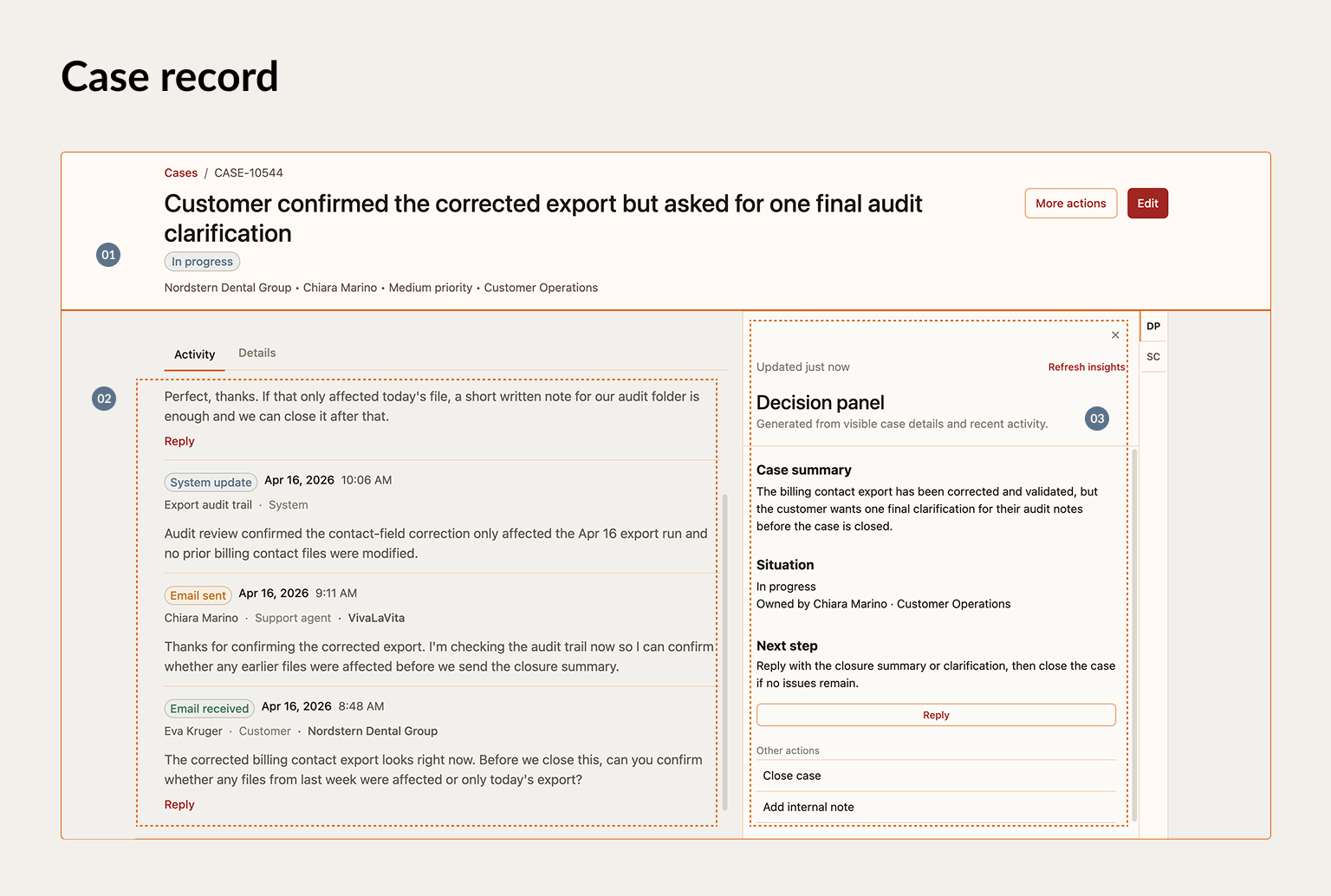
The case becomes a workspace for understanding the situation and acting on it.
4. Giving AI a clear job
The structured workflow creates a better foundation for AI.
Instead of asking a model to infer everything from a long, unstructured timeline, the product exposes signals such as priority, ownership, SLA risk, waiting time and escalation state.
Deterministic information remains deterministic. AI works on top of it to interpret the situation, summarise what happened, recommend a next step or help draft a response.
The decision panel separates those jobs:
- A summary explains the case.
- A situation statement interprets its current condition.
- A recommendation proposes the next step.
- A primary action lets the user move forward.
- Alternative actions keep the workflow flexible and under human control.
This is deliberately less magical than an autonomous agent. It is also easier to understand, evaluate and trust. A weak summary can be corrected without affecting the operational state. A recommendation can evolve without rewriting the whole experience.
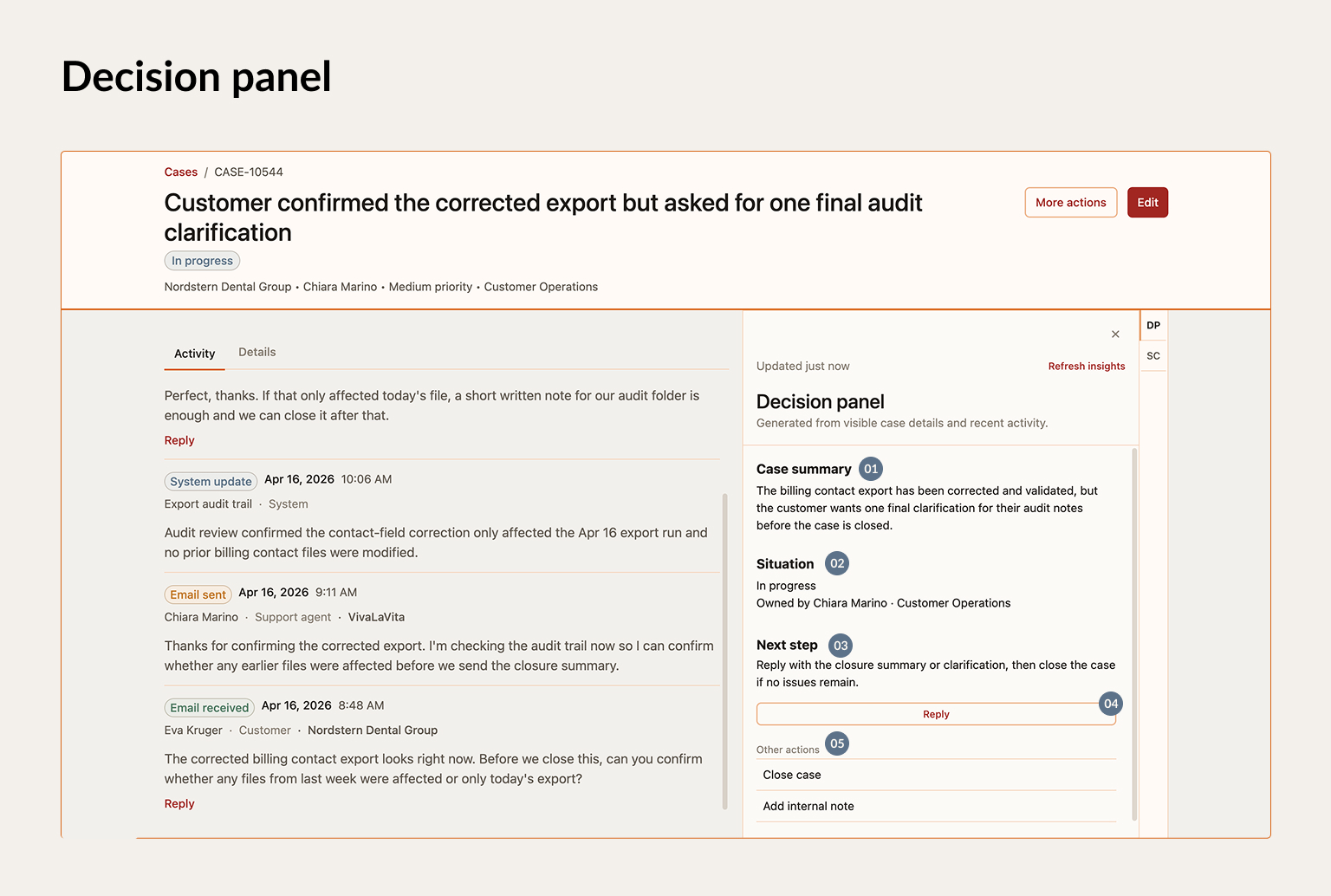
AI is scoped into specific operational jobs instead of becoming a parallel workflow.
The same context supports communication. When the system recommends replying to a customer, it can prepare a draft grounded in the case state, recent activity and blocker. The user still reviews, edits and sends it.
The point is not to remove the person. It is to remove the repeated work of reconstructing context.
5. Making the AI layer testable
AI output is probabilistic. That makes evaluation part of the product, not a final quality check.
I started structuring each capability as a separate job with its own prompt, test cases and expected outcomes. Case files provide consistent input. Generated summaries and recommendations can be compared across prompt versions. Failures are documented instead of disappearing into another round of vague prompting.
This makes improvement inspectable. It also shows whether an AI feature is helping the workflow or only producing convincing text.
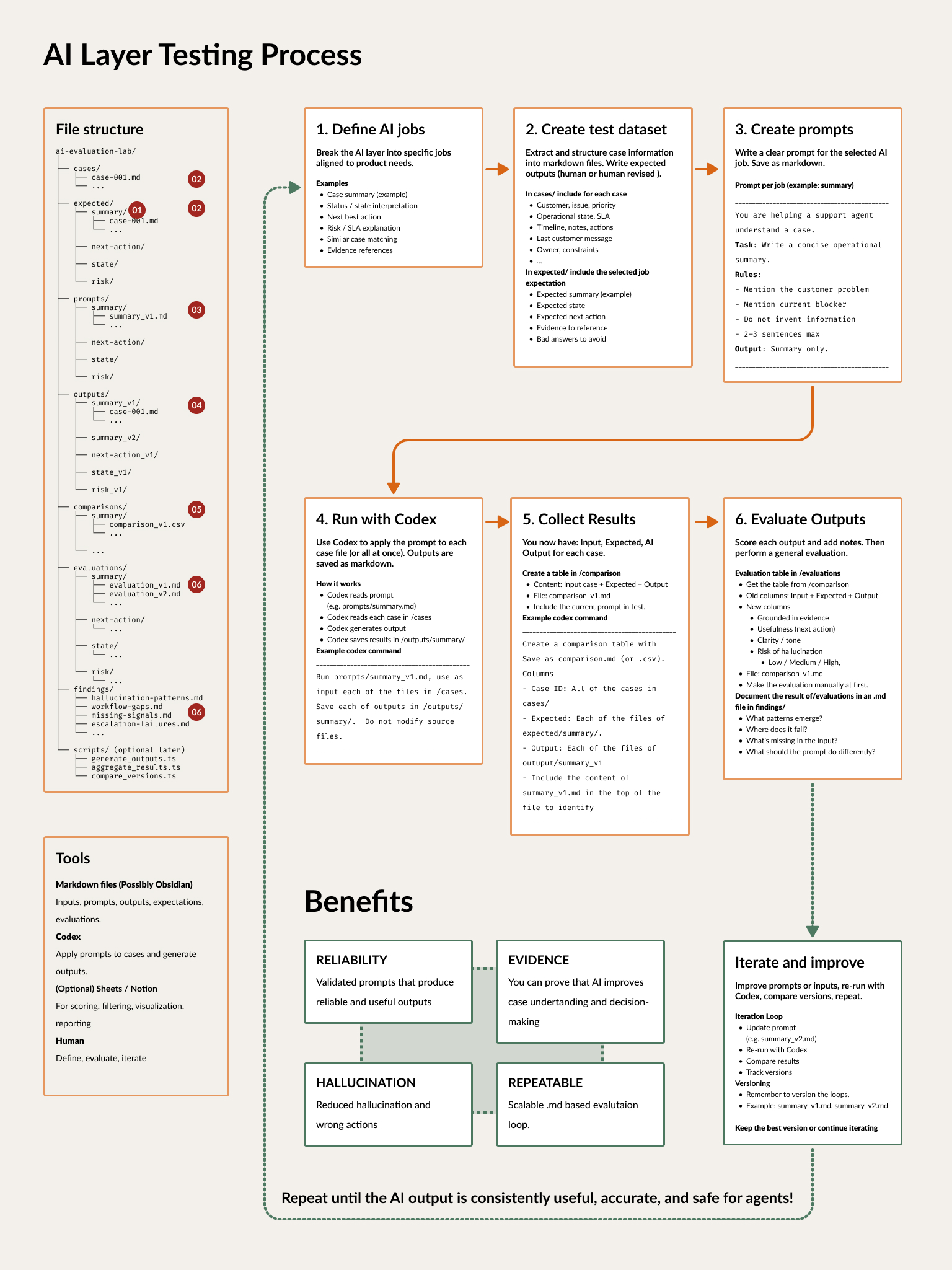
The evaluation loop treats AI outputs as product behaviour that can be tested and improved.
Tradeoff
This is more constrained than a typical CRUD system. Not every edge case maps neatly to a simplified operational model. Derived actions require strong logic, and a recommendation can feel opaque if the system misreads the case condition.
The alternative is familiar and worse: a flexible product where users search, infer, compare, reconstruct and decide while the software stays neutral.
I chose to make the product carry more of that cognitive load while keeping operational truth explicit and final control with the user.
From model to working prototype
The complete system is implemented as a working React prototype with semantic design tokens, reusable components and constrained AI-assisted development.
The prototype matters because the interesting part is not any screen in isolation. It is how the operational model, queue, case workspace, decision support and design system work together as one product.
It is still a lab. The data is simplified, edge cases need more pressure testing and the AI evaluation layer is early. But it is far enough to use, test and challenge as a system rather than a collection of ideas.
Building with AI let me move across product framing, information architecture, interaction design, systems, content and implementation without turning every transition into a separate handoff.
That does not remove the complexity. It lets me stay with it for longer and push the product further.
What changed
- A case list that helps support reps decide where to start: The workload, urgency, ownership and current state are visible before anyone opens a case.
- One place to understand the case: Essential details, messages, notes, system updates and the AI summary come together in one readable story.
- AI focused on a few useful tasks: It explains the situation, recommends a next step and helps draft a reply using facts the product already knows. The support rep can check, change or ignore every suggestion.
- Less repeated mental work: Support reps no longer have to rebuild the same context before deciding what to do or replying to the customer.
- A complete flow that can be tested: The case model, triage queue, case page, AI support and design system work together in one React prototype, rather than as separate screen concepts.