Workflows
Structuring state, ownership, and next steps to make operational complexity easier to reason about. Designing for decision-making, not data display.
Problem
Most case management systems are shaped by the backend, not by the way people actually work. That creates friction in the two moments that matter most: knowing which case needs attention, and understanding what happened once you open it. Instead of seeing a clear queue, agents are forced to hunt through records, combine generic filters, and reconstruct the story from scattered fields, notes, and messages.
That friction eventually reaches the customer. Replies slow down, context gets missed, work gets duplicated, and customers are often asked to explain the same issue again. The deeper issue is structural: the list behaves like a database table, not a queue, and the record behaves like a form, not a workspace.
Solution
I reframed the product around how support work actually happens. The system needed to answer three questions quickly and consistently:
- What is happening
- What matters
- What should I do next
Everything else is secondary. That meant treating cases as operational situations rather than collections of fields, making state explicit instead of scattered, and deriving actions from context instead of placing them generically. The product stops displaying data and starts supporting decisions.
How it was applied
The change is not in one screen. It is in the model that connects the queue, the record, and the next action.
I structured the workflow around three layers: the operational state model, the triage list, and the case record. Each layer reduces a different kind of friction.
1. Operational state model
.jpg)
The first step was to separate understanding from deciding.
A normal status like Open, In progress or Resolved is useful, but it does not tell the agent what the case needs right now. Two cases can both be open, but one may be waiting on the customer, another may need assignment, and another may be close to breaching SLA.
The model makes that distinction explicit. Lifecycle status, operational state, and signals combine into a work-aware case condition. From there, the system can support smarter triage, prioritization, and next actions.
The benefit is that the product no longer treats cases as static records. It can understand them as active work in different conditions, which is what makes the list, the record view, and the future AI layer more useful.
2. Case list as triage queue
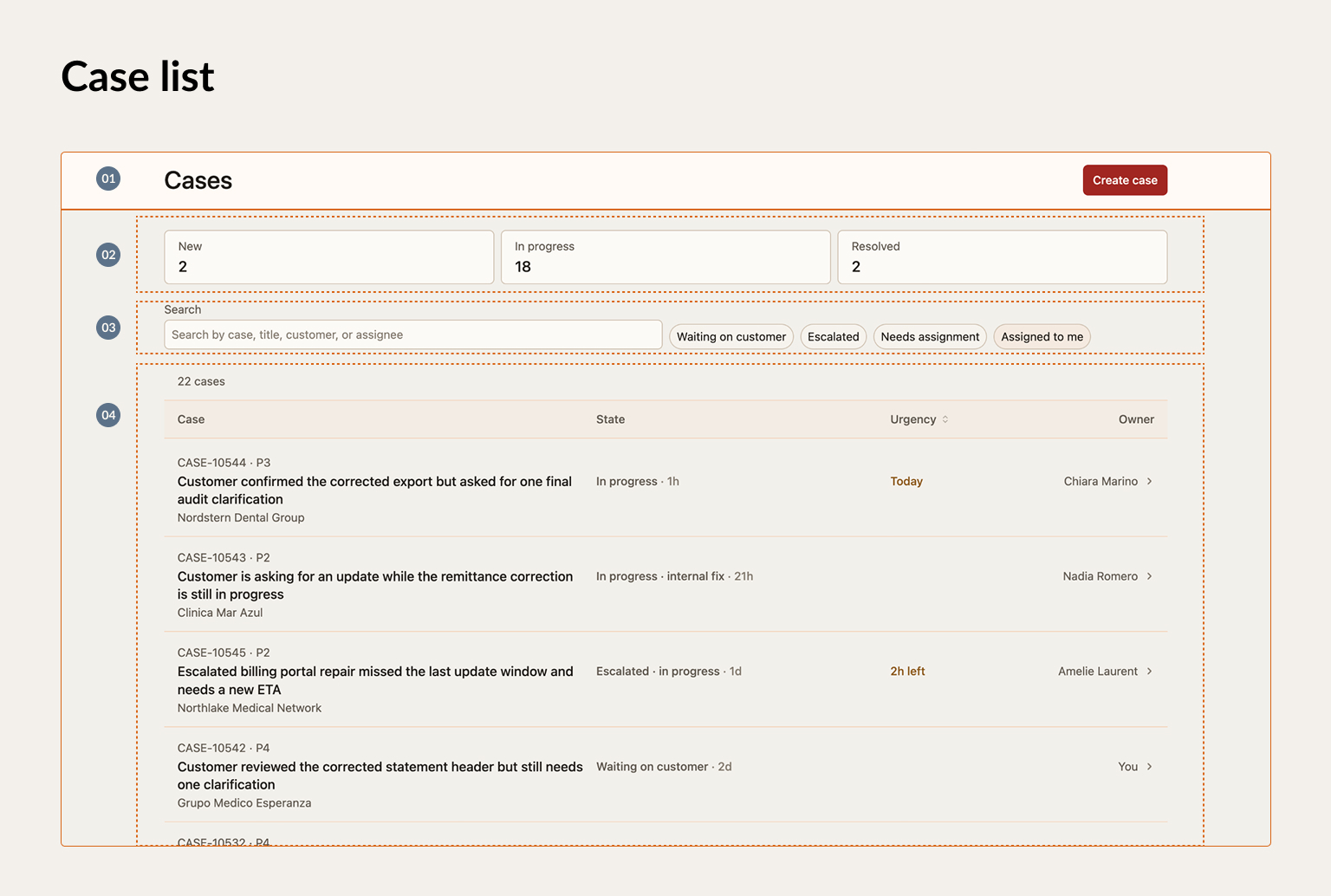
- List header
- Queue summary
- Work-aware filters
- Case table
The case list stops being a passive table and becomes a triage queue.
The top of the page frames the workload before the agent looks at individual rows: how many cases exist, how they are distributed, and which operational groups matter. Search and filters are shaped around real work states, such as waiting on customer, escalated, needs assignment, or assigned to me.
The table then supports comparison under pressure. Case identity, operational state, urgency, and ownership are separated so agents can scan quickly without reading every case in full.
The benefit is faster prioritization. The agent can understand the shape of the queue, focus on the right subset, and decide what deserves attention next.
3. Case record as decision workspace
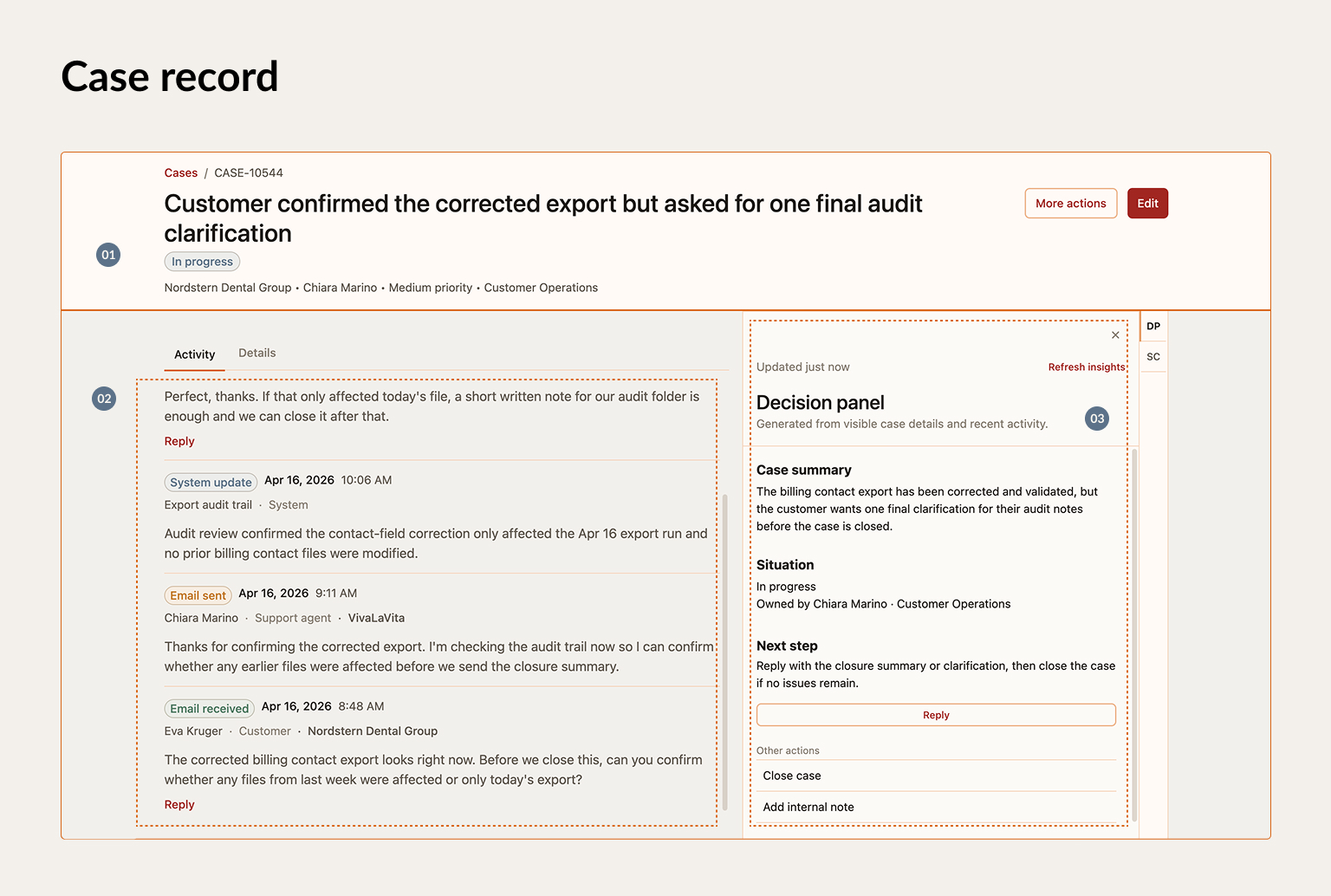
- Case header
- Activity timeline
- Decision panel
The case record stops being a form and becomes a decision workspace.
The header gives immediate orientation before the agent starts working. The activity timeline then turns scattered messages, notes, replies, and system updates into one readable story.
The decision panel uses that context to make the next step clearer. Because the system already understands the case condition, ownership, urgency, and recent activity, it can suggest what should happen next: reply, follow up, escalate, close, or add an internal note.
The benefit is confidence. Agents can understand the situation faster, avoid repeated questions, and move the case forward with less back and forth.
Tradeoff
This model is more constrained than a typical CRUD system.
You lose some flexibility in how cases can be represented. Not every edge case maps cleanly to a simplified state model, and derived actions require strong logic. If the system gets the condition wrong, the recommendation can feel opaque or misleading.
There is also a bet in the timeline. Bringing activity into one stream increases clarity, but only if the structure holds under scale. Without good grouping, hierarchy, and filtering, the timeline can become another source of noise.
The bet is that the alternative is familiar and worse: a flexible system where users do the hard work manually. They search, infer, compare, reconstruct, and decide while the product stays neutral.
This model goes takes a different path. The product should carry more of that cognitive load.
Outcome
The workflow becomes easier to prioritize, easier to understand, and easier to act on.
Instead of making agents reconstruct the work manually, the system gives them a clearer queue, a more readable case history, and a more confident path to action.
The main shifts are:
- Faster prioritization: agents can understand the shape of the queue and focus on the cases that need attention first.
- Faster case understanding: the record tells a coherent story instead of scattering context across fields, tabs, and notes.
- More confident action: next steps are connected to state, ownership, urgency, and recent activity.
- Less duplicated work: agents have the context they need, which reduces repeated questions and unnecessary back and forth.
- Better customer experience: replies can be faster, more relevant, and less dependent on the customer explaining the same issue again.
The product shifts from a system of record to a system of resolution.
That is the important change. The interface is no longer just where case data lives. It becomes the operational layer that helps the team decide what matters, what comes next, and how to close the loop.
Next steps
The structure is in place, but the next phase is to pressure-test it with more realistic complexity.
The main areas to develop are:
- Validate the model under messier data: test noisy, incomplete, multi-actor cases and longer timelines.
- Expand the action model: cover escalation, closure, reassignment, follow-up, and better prioritization logic.
- Prepare the AI layer: use the structured workflow model as the basis for summaries, recommendations, decision support, and suggested next cases to focus on.
The goal is not to add complexity. It is to prove that the model still holds when the work becomes messy.